How to promote your app on TikTok without ads (a practical guide for indie developers)
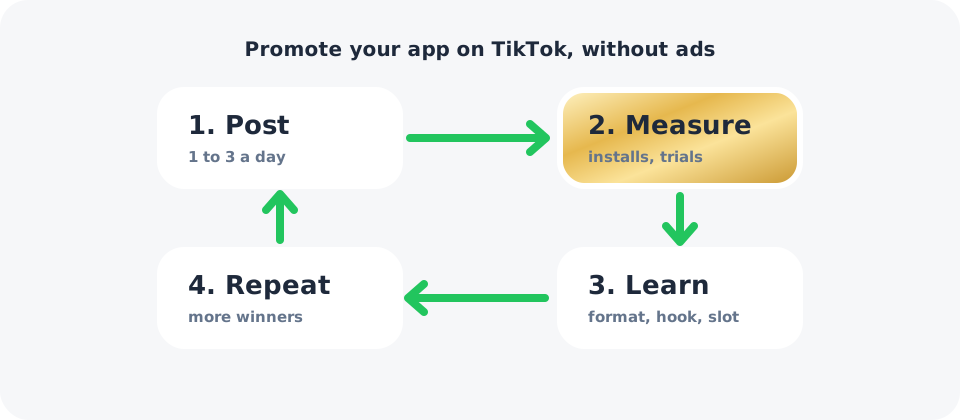
TikTok is one of the few places where an unknown indie app can reach thousands of people for free. It's also where many developers post daily for a month and get nothing. The difference is rarely luck. It's usually the hook, the format, and whether they measured the right thing.
This guide is the process we use for our own apps, step by step.
1. Set up the account for your audience, not for you
- Create a dedicated account for the app (or for the problem it solves), not your personal one.
- Pick the audience's country. New accounts tend to reach people in their own region first. If your users are in the US and you're not, keep that in mind when you judge early results, and post at US times.
- Write a one-line bio that says what the app does, plus how to find it ("Search YourApp on the App Store").
- Warm up briefly. Spend a few days watching and engaging with videos in your niche so the account has a clear topic. Skip anything against TikTok's rules, like bought followers or automation.
2. Talk about the problem, not the app
People don't scroll TikTok looking for apps. They stop for things that feel like their life. The best app videos open with the problem and show the app as the answer.
| Instead of | Try |
|---|---|
| "Check out my new habit tracker" | "I quit my phone at night for 30 days. Here's what changed." |
| "Our workout app has 500 exercises" | "How to build a wider back (3 moves)" |
| "Introducing our alarm app" | "My alarm texted me first" |
The last two are real hooks from our own workout and alarm apps. Notice that none of them mention the app.
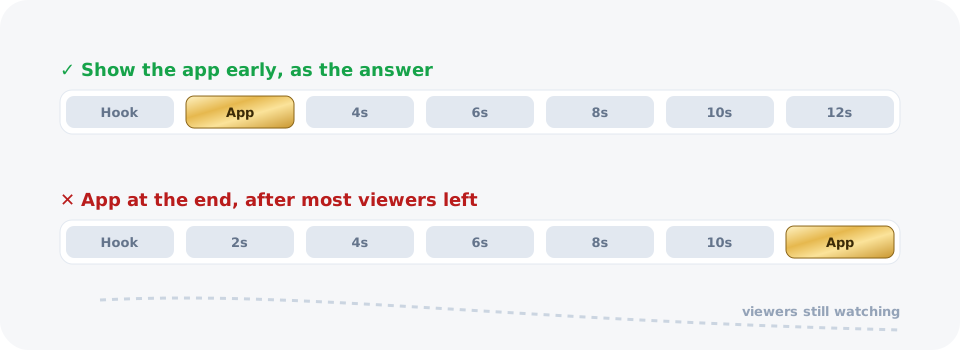
3. Show the app in the first few seconds
A common reason for "views but no installs" is that the app appears at the end, after most viewers have scrolled away. Put a screen of the app in the first slide or the first three seconds, as the solution to the hook.
4. Choose two or three formats and repeat them
Formats that work well for apps:
- Slideshows (5 to 7 slides): fast to make, easy to test hooks. Great for tips, routines and "how to" content.
- POV / relatable videos: "POV: you finally…" with the app as the turning point.
- Screen recordings with a voiceover: show one feature solving one problem.
- Talking head: your face builds trust, especially for productivity and finance apps.
Pick two or three, post them consistently, and drop the ones that don't bring installs after a few weeks.
5. Post consistently at fixed times
Post one to three times a day at fixed times in your audience's time zone. Fixed times let you compare results fairly. Our guide to the best time to post on TikTok for app downloads explains how to test slots.
6. Measure installs and trials, not views
Views tell you about reach. Installs and trials tell you about money. For each post, compare what happened in the 24 to 48 hours after posting with a normal day at that hour:
- new installs (or new customers in RevenueCat),
- new trials,
- and where those installs came from.
Add a “How did you hear about us?” question to onboarding as a second signal. When both agree, you can trust the result.
7. Double down on what converts
Every week, look at your posts grouped by format and hook, not one by one:
- Which format brought the most installs per 1,000 views?
- Which hooks brought trials, not just likes?
- Which slots worked for each account?
Make three more of the winners, drop the losers, and repeat.
What to expect
Be patient. New accounts often start with small view counts, and our own videos mostly stayed between 100 and 800 views in the first weeks. At that size, single posts are noisy, so judge formats and slots across many posts. The goal of the first month is not virality. It's finding one format and one slot that reliably bring installs.
Common mistakes
- Making ads instead of content. People skip anything that looks like an ad.
- Showing the app too late. Put it in the first seconds.
- Chasing views. A viral video from the wrong country brings no trials.
- Changing everything at once. Change one thing per week: the hook, the format, or the time.
- Stopping too early. Most accounts need several weeks of daily posting before patterns appear.
The short version
Talk about the problem, show the app early, post daily at fixed times, and judge every video by installs and trials. Postnomics does the measuring and the scheduling for you, so you can spend your time making the videos.
Frequently asked questions
Can you promote an app on TikTok for free?
Yes. Organic posting costs only your time. Most indie developers post one to three videos a day and expect it to take several weeks before a format starts working.
How often should I post to promote an app on TikTok?
One to three times a day is common. Consistency matters more than volume: posting daily for a month teaches you more than ten posts in one week.
Should I show my app in the TikTok video?
Yes, early. If the app only appears at the end, many viewers never see it. Show it within the first few seconds, ideally as the answer to the problem in your hook.
How do I know if TikTok is bringing app downloads?
Compare installs and trials in the 24 to 48 hours after each post with a normal day at that hour, and add a "How did you hear about us?" question in onboarding.
Slideshows or videos?
Both can work. Slideshows are faster to make and easy to test; videos with a face often build more trust. Test both and keep the format with more installs per 1,000 views.